1、SQL
1 DataSource
通常项目中使用 MySQL,Oracle,PostgreSQL 等大型关系数据库。Java 中的 jdbc 技术支持了多种关系型数据库的访问。在代码中访问数据库,我们需要知道数据库程序所在的 ip,端口,访问数据库的用户名和密码以及数据库的类型信息。以上信息用来初始化数据源,数据源也就是 DataSource。数据源表示数据的来源,从某个 ip 上的数据库能够获取数据。javax.sql.DataSource 接口表示数据源,提供了标准的方法获取与数据库绑定的连接对象(Connection)。
javax.sql.Connection 是连接对象,在 Connection 上能够从程序代码发送查询命令,更新数据的语句给数据库;同时从 Connection 获取命令的执行结果。Connection 很重要,像一个电话线把应用程序和数据库连接起来。
DataSource 在 application 配置文件中以 spring.datasource.*作为配置项。类似下面的代码:
spring.datasource.url=jdbc:mysql://localhost/mydb
spring.datasource.username=dbuser
spring.datasource.password=dbpass
DataSourceProperties.java 是数据源的配置类,更多配置参考这个类的属性。
@ConfigurationProperties(prefix = "spring.datasource")
public class DataSourceProperties implements BeanClassLoaderAware, InitializingBean {

}
Spring Boot 能够从 spring.datasource.url 推断所使用的数据驱动类,如果需要特殊指定请设置 spring.datasource.driver-class-name 为驱动类的全限定名称。
Spring Boot 支持多种数据库连接池,优先使用 HikariCP,其次是 Tomcat pooling,再次是 Commons DBCP2,如果以上都没有,最后会使用 Oracle UCP 连接池。当项目中 starter 依赖了 spring-boot-starter-jdbc 或者 spring-boot-starter-data-jpa 默认添加 HikariCP 连接池依赖,也就是默认使用 HikariCP 连接池。
2 数据源的自动配置
HikariDataSource
2.1 准备环境
访问数据库先准备数据库的 script。SpringBoot 能够自动执行 DDL,DML 脚本。两个脚本文件名称默认是 schema.sql 和 data.sql。脚本文件在类路径中自动加载。
自动执行脚本还涉及到 spring.sql.init.mode 配置项:
- always:总是执行数据库初始化脚本
- never:禁用数据库初始化
Spring Boot 处理特定的数据库类型,为特定的数据库定制 script 文件。首先设置 spring.sql.init.platform=hsqldb、h2、oracle、mysql、postgresql 等等,其次准备
schema-${platform}.sql、data-${platform}.sql脚本文件。
准备数据库和脚本依赖
schema.sql
CREATE TABLE `article` (
  `id` int(11) NOT NULL AUTO_INCREMENT COMMENT '主键',
  `user_id` int(11) NOT NULL COMMENT '作者ID',
  `title` varchar(100) NOT NULL COMMENT '文章标题',
  `summary` varchar(200) DEFAULT NULL COMMENT '文章概要',
  `read_count` int(11) unsigned zerofill NOT NULL COMMENT '阅读读数',
  `create_time` datetime NOT NULL COMMENT '创建时间',
  `update_time` datetime NOT NULL COMMENT '最后修改时间',
  PRIMARY KEY (`id`)) ENGINE=InnoDB AUTO_INCREMENT=1 DEFAULT CHARSET=utf8mb4;
data.sql
INSERT INTO `article` VALUES ('1','2101','SpringBoot核心注解',
'核心注解的主要作用','00000008976','2023-01-16 12:11:12','2023-01-16 12:11:19');
INSERT INTO `article` VALUES ('2','356752','JVM调优',
'HotSpot虚拟机详解','00000000026','2023-01-16 12:15:27','2023-01-16 12:15:30');
2.2 导入 JDBC 场景
Spring Boot 提供了一些数据场景
SpringBoot Starter Table1 - Spring Boot application starters 中 spring-boot-starter-data-* 部分为 SpringBoot 中的数据 starter。
导入 Spring Boot 提供的 JDBC 数据场景,只需要添加下面依赖。通过 Maven 或查找源码(Ctrl+点击)可以获得对应的版本号。
<dependency>
  <groupId>org.springframework.boot</groupId>
  <artifactId>spring-boot-starter-jdbc</artifactId>
</dependency>

<dependency>
   <groupId>org.springframework.boot</groupId>
   <artifactId>spring-boot-starter-test</artifactId>
   <scope>test</scope>
</dependency>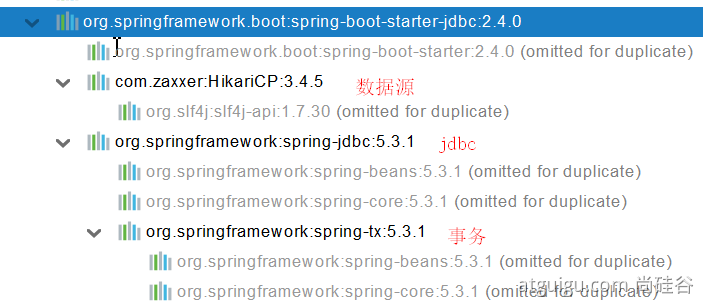
2.3 导入数据库依赖
为什么导入 JDBC 场景,官方不导入驱动?
官方不知道我们接下要操作什么数据库。
配置数据库依赖版本
- Spring Boot 配置中包含了默认的数据库依赖版本。通过
spring-boot-starter-parent到spring-boot-dependencies中查看配置的版本。 - 如果默认的版本与当前设备对应的 mysql 版本不同,最好进行修改依赖的版本。
修改依赖版本
- 直接在配置依赖处增加<version>字段。maven 的就近依赖原则。
- 重新声明版本,需要获得 spring boot 默认的版本字段怎么写的。maven 的属性的就近优先原则。
<!--方案2-->
<properties>
    <java.version>1.8</java.version>
    <mysql.version>5.1.49</mysql.version>
</properties>
<!--方案1-->
<dependency>
    <groupId>mysql</groupId>
    <artifactId>mysql-connector-java</artifactId>
    <version>5.1.49</version>
</dependency>
maven 的三大原则
依赖传递原则,依赖就近原则(最短路径原则),声明优先原则*
2.4 分析自动配置
自动配置的类
位置:org.springframework.boot.auticonfigure.jdbc.*
DataSourceAutoConfiguration : 数据源的自动配置
- 修改数据源相关的配置:spring.datasource
- 数据库连接池的配置,是自己容器中没有 DataSource 才自动配置的
- 底层配置好的连接池是:HikariDataSource
@Configuration(proxyBeanMethods = false)
@Conditional(PooledDataSourceCondition.class)
@ConditionalOnMissingBean({ DataSource.class, XADataSource.class })
@Import({ DataSourceConfiguration.Hikari.class, DataSourceConfiguration.Tomcat.class,
         DataSourceConfiguration.Dbcp2.class, DataSourceConfiguration.OracleUcp.class,
         DataSourceConfiguration.Generic.class, DataSourceJmxConfiguration.class })
protected static class PooledDataSourceConfiguration
DataSourceTransactionManagerAutoConfiguration: 事务管理器的自动配置
JdbcTemplateAutoConfiguration: JdbcTemplate 的自动配置,可以来对数据库进行 crud
- 可以修改这个配置项@ConfigurationProperties(prefix = “spring.jdbc”) 来修改 JdbcTemplate
- @ Bean@Primary JdbcTemplate;容器中有这个组件
JndiDataSourceAutoConfiguration: jndi 的自动配置
XADataSourceAutoConfiguration: 分布式事务相关的
2.5 修改 datasource 配置项
时区报错的可以在设置 MySQL 时区为东八区:
set global time_zone='+8:00'
然后查看时间是否与系统时间一致:
select now();
spring:
  datasource:
    url: jdbc:mysql://localhost:3306/db_account?characterEncoding=UTF-8&serverTimezone=UTC
    username: root
    password: 123456
driver-class-name: com.mysql.cj.jdbc.Driverspring.datasource.driver-class-name=com.mysql.cj.jdbc.Driver
spring.datasource.url=jdbc:mysql://localhost:3306/blog?serverTimezone=Asia/Shanghai&useUnicode=true&characterEncoding=utf8&autoReconnect=true&useSSL=false
spring.datasource.username=root
spring.datasource.password=123456
#总是执行数据库脚本,以后设置为never
spring.sql.init.mode=always2.6 JDBCTemplete 访问 MySQL
JdbcTemplate 上手快,功能非常强大。提供了丰富、实用的方法,归纳起来主要有以下几种类型的方法:
- execute 方法:可以用于执行任何 SQL 语句,常用来执行 DDL 语句。
- update、batchUpdate 方法:用于执行新增、修改与删除等语句。
- query 和 queryForXXX 方法:用于执行查询相关的语句。
- call 方法:用于执行数据库存储过程和函数相关的语句。
@Slf4j
@SpringBootTest
class Boot05WebAdminApplicationTests {
    @Autowired
    JdbcTemplate jdbcTemplate;
    @Test
    void contextLoads() {
//        jdbcTemplate.queryForObject("select * from account_tbl")
//        jdbcTemplate.queryForList("select * from account_tbl",)
        Long aLong = jdbcTemplate.queryForObject("select count(*) from account_tbl", Long.class);
        log.info("记录总数:{}",aLong);
    }
}
测试聚合函数
@Test
void testCount() {
    String sql="select count(*) as ct from article";
    Long count = jdbcTemplate.queryForObject(sql, Long.class);
System.out.println("文章总数 = " + count);
}
测试“?”占位符
@Test
void testQuery() {
    // ?作为占位符
    String sql = "select * from article where id= ? ";
    //BeanPropertyRowMapper 将查询结果集,列名与属性名称匹配, 名称完全匹配或驼峰
    ArticlePO article = jdbcTemplate.queryForObject(sql,
        new BeanPropertyRowMapper<>(ArticlePO.class), 1 );
	System.out.println("查询到的文章 = " + article);
}
测试自定义 RowMapper
@Test
void testQueryRowMapper() {
  //只能查询出一个记录,查询不出记录抛出异常
    String sql = "select * from article where id= " + 1;
    ArticlePO article = jdbcTemplate.queryForObject(sql, (rs, rownum) -> {
      var id = rs.getInt("id");
      var userId = rs.getInt("user_id");
      var title = rs.getString("title");
      var summary = rs.getString("summary");
      var readCount = rs.getInt("read_count");
      var createTime = new Timestamp(rs.getTimestamp("create_time").getTime())
					.toLocalDateTime();
      var updateTime = new Timestamp(rs.getTimestamp("update_time").getTime())
					.toLocalDateTime();
      return new ArticlePO(id, userId, title, summary, readCount,
                          createTime, updateTime);
	});
	System.out.println("查询的文章 = " + article);
}
测试 List 集合
@Test
void testList() {
    String sql="select * from article  order by id ";
    List<Map<String, Object>> listMap = jdbcTemplate.queryForList(sql);
    listMap.forEach( el->{
	        el.forEach( (field,value)->{
			System.out.println("字段名称:"+field+",列值:"+value);
		});
        System.out.println("===================================");
	});
}
2.7 NamedParameterJdbcTemplate
NamedParameterJdbcTemplate 是 Spring JDBC 提供的一个类,它是 JdbcTemplate 的扩展,可以使用命名参数代替占位符。NamedParameterJdbcTemplate 可以在执行查询时把值绑定到 SQL 里的命名参数,而不是使用索引参数。这样可以使代码更加清晰易懂,而且不容易出错。NamedParameterJdbcTemplate 还提供了一些方法,如 execute 方法、query 及 queryForXXX 方法、update 及 batchUpdate 方法等。
在使用模板的位置注入 NamedParameterJdbcTemplate 对象,编写 SQL 语句,在 SQL 中 WHERE 部分“:命名参数”。调用 NamedParameterJdbcTemplate 的诸如 query,queryForObject, execute,update 等时,将参数封装到 Map 中。
step1:注入模板对象
@Resource
private JdbcTemplate jdbcTemplate;
step2: 使用命名参数
@Test
void testNameQuery() {
    // :参数名
    String sql="select count(*) as ct from article where user_id=:uid and read_count > :num";

	//key是命名参数
    Map<String,Object> param = new HashMap<>();
    param.put("uid", 2101);
    param.put("num", 0);
    Long count = nameJdbcTemplate.queryForObject(sql, param, Long.class);
    System.out.println("用户被阅读的文章数量 = " + count);
}
2.8 多表查询
多表查询关注是查询结果如何映射为 Java Object。常用两种方案:一种是将查询结果转为 Map。列名是 key,列值是 value,这种方式比较通用,适合查询任何表。第二种是根据查询结果中包含的列,创建相对的实体类。属性和查询结果的列对应。将查询结果自定义 RowMapper、ResultSetExtractor 映射为实体类对象。
现在创建新的表 article_detail,存储文章内容,与 article 表是一对一关系。

@Test
void testArticleContent() {
   String sql= """
       select m.*,d.id as detail_id, d.article_id,d.content
        from article m join article_detail d
        on  m.id = d.article_id
        where m.id=:id
        """;
    Map<String,Object> param = new HashMap<>();
    param.put("id", 1);

    List<ArticleMainPO> list = nameJdbcTemplate.query(sql, param, (rs, rowNum) -> {
      var id = rs.getInt("id");
      var userId = rs.getInt("user_id");
      var title = rs.getString("title");
      var summary = rs.getString("summary");
      var readCount = rs.getInt("read_count");
      var createTime = new Timestamp(rs.getTimestamp("create_time").getTime())
			.toLocalDateTime();
      var updateTime = new Timestamp(rs.getTimestamp("update_time").getTime())
			.toLocalDateTime();

      //文章详情
      var detailId = rs.getInt("detail_id");
      var content = rs.getString("content");
      var articleId = rs.getInt("article_id");

      ArticleDetailPO detail = new ArticleDetailPO();
      detail.setId(detailId);
      detail.setArticleId(articleId);
      detail.setContent(content);

     return new ArticleMainPO(id, userId, title, summary, readCount,
                             createTime, updateTime, detail);
    });

    list.forEach(m -> {
      System.out.println("m.getId() = " + m.getId());
      System.out.println("m.getArticleDetail() = " + m.getArticleDetail());
    });

}
2.9 总结
JdbcTemplate 的优点简单,灵活,上手快,访问多种数据库。对数据的处理控制能力比较强,RowMapper, ResultSetExtractor 能够提供按需要灵活定制记录集与实体类的关系。
缺点:对 SQL 要求高,适合对 SQL 比较了解,自定义查询结果比较多,调优需求的。 JdbcTemplate 对象的调整参数,比较少。可设置 spring.jdbc.template.开头的配置项目,比如设置超时为 10 秒,spring.jdbc.template.query-timeout=10。
3 使用 Druid 数据源
3.1 druid 官方 github 地址
官方 Github 地址:https://github.com/alibaba/druid
官方 Github WIKI 地址:https://github.com/alibaba/druid/wiki/首页
整合第三方技术的两种方式
- 自定义
- 找 starter
3.2 自定义方式
视频链接: https://www.bilibili.com/video/BV19K4y1L7MT?p=61
或者可以看一下 druid-spring-boot-starter 中的代码,位置 com.alibaba.druid.spring.boot.autoconfigure。
创建数据源
        <dependency>
            <groupId>com.alibaba</groupId>
            <artifactId>druid</artifactId>
            <version>1.1.17</version>
        </dependency>

<bean id="dataSource" class="com.alibaba.druid.pool.DruidDataSource"
		destroy-method="close">
		<property name="url" value="${jdbc.url}" />
		<property name="username" value="${jdbc.username}" />
		<property name="password" value="${jdbc.password}" />
		<property name="maxActive" value="20" />
		<property name="initialSize" value="1" />
		<property name="maxWait" value="60000" />
		<property name="minIdle" value="1" />
		<property name="timeBetweenEvictionRunsMillis" value="60000" />
		<property name="minEvictableIdleTimeMillis" value="300000" />
		<property name="testWhileIdle" value="true" />
		<property name="testOnBorrow" value="false" />
		<property name="testOnReturn" value="false" />
		<property name="poolPreparedStatements" value="true" />
		<property name="maxOpenPreparedStatements" value="20" />
StatViewServlet
druid 版本 2.1 的好像已经没有 StatviewServlet 了
StatViewServlet 的用途包括:
-
提供监控信息展示的 html 页面
-
提供监控信息的 JSON API
	<servlet>
		<servlet-name>DruidStatView</servlet-name>
		<servlet-class>com.alibaba.druid.support.http.StatViewServlet</servlet-class>
	</servlet>
	<servlet-mapping>
		<servlet-name>DruidStatView</servlet-name>
		<url-pattern>/druid/*</url-pattern>
	</servlet-mapping>
StatFilter
用于统计监控信息;如 SQL 监控. URI 监控
需要给数据源中配置如下属性;可以允许多个 filter,多个用,分割;如:

<property name="filters" value="stat,slf4j" />
系统中所有 filter:
| 别名 | Filter 类名 |
|---|---|
| default | com.alibaba.druid.filter.stat.StatFilter |
| stat | com.alibaba.druid.filter.stat.StatFilter |
| mergeStat | com.alibaba.druid.filter.stat.MergeStatFilter |
| encoding | com.alibaba.druid.filter.encoding.EncodingConvertFilter |
| log4j | com.alibaba.druid.filter.logging.Log4jFilter |
| log4j2 | com.alibaba.druid.filter.logging.Log4j2Filter |
| slf4j | com.alibaba.druid.filter.logging.Slf4jLogFilter |
| commonlogging | com.alibaba.druid.filter.logging.CommonsLogFilter |
慢 SQL 记录配置
<bean id="stat-filter" class="com.alibaba.druid.filter.stat.StatFilter">
    <property name="slowSqlMillis" value="10000" />
    <property name="logSlowSql" value="true" />
</bean>

使用 slowSqlMillis 定义慢 SQL 的时长
3.3 使用官方 starter 方式
引入 druid-starter
<dependency>
<groupId>com.alibaba</groupId>
<artifactId>druid-spring-boot-starter</artifactId>
<version>1.1.17</version>
</dependency>
分析自动配置
-
扩展配置项 spring.datasource.druid
-
DruidSpringAopConfiguration.class, 监控 SpringBean 的;配置项:spring.datasource.druid.aop-patterns
-
DruidStatViewServletConfiguration.class, 监控页的配置:spring.datasource.druid.stat-view-servlet;默认开启
-
DruidWebStatFilterConfiguration.class, web 监控配置;spring.datasource.druid.web-stat-filter;默认开启
-
DruidFilterConfiguration.class}) 所有 Druid 自己 filter 的配置
    private static final String FILTER_STAT_PREFIX = "spring.datasource.druid.filter.stat";
    private static final String FILTER_CONFIG_PREFIX = "spring.datasource.druid.filter.config";
    private static final String FILTER_ENCODING_PREFIX = "spring.datasource.druid.filter.encoding";
    private static final String FILTER_SLF4J_PREFIX = "spring.datasource.druid.filter.slf4j";
    private static final String FILTER_LOG4J_PREFIX = "spring.datasource.druid.filter.log4j";
    private static final String FILTER_LOG4J2_PREFIX = "spring.datasource.druid.filter.log4j2";
    private static final String FILTER_COMMONS_LOG_PREFIX = "spring.datasource.druid.filter.commons-log";
    private static final String FILTER_WALL_PREFIX = "spring.datasource.druid.filter.wall";
配置示例
spring:
  datasource:
    url: jdbc:mysql://localhost:3306/db_account
    username: root
    password: 123456
    driver-class-name: com.mysql.jdbc.Driver

    druid:
      aop-patterns: com.atguigu.admin.* #监控SpringBean
      filters: stat,wall # 底层开启功能,stat(sql 监控),wall(防火墙)

      stat-view-servlet: # 配置监控页功能
        enabled: true
        login-username: admin
        login-password: admin
        resetEnable: false

      web-stat-filter: # 监控 web
        enabled: true
        urlPattern: /*
        exclusions: "*.js,*.gif,*.jpg,*.png,*.css,*.ico,/druid/*"

      filter:
        stat: # 对上面 filters 里面的 stat 的详细配置
          slow-sql-millis: 1000
          logSlowSql: true
          enabled: true
        wall:
          enabled: true
          config:
            drop-table-allow: false
SpringBoot 配置示例
https://github.com/alibaba/druid/tree/master/druid-spring-boot-starter
配置项列表
https://github.com/alibaba/druid/wiki/DruidDataSource 配置属性列表
4 整合 MyBatis 操作
<dependencies>
 <dependency>
	 <groupId>org.mybatis.spring.boot</groupId>
	  <artifactId>mybatis-spring-boot-starter</artifactId>
	  <version>3.0.0</version>
 </dependency>

 <dependency>
	  <groupId>com.mysql</groupId>
	  <artifactId>mysql-connector-j</artifactId>
	  <scope>runtime</scope>
 </dependency>

 <dependency>
	  <groupId>org.projectlombok</groupId>
	  <artifactId>lombok</artifactId>
	  <optional>true</optional>
 </dependency>

 <dependency>
	  <groupId>org.springframework.boot</groupId>
	  <artifactId>spring-boot-starter-test</artifactId>
	 <scope>test</scope>
 </dependency>
</dependencies>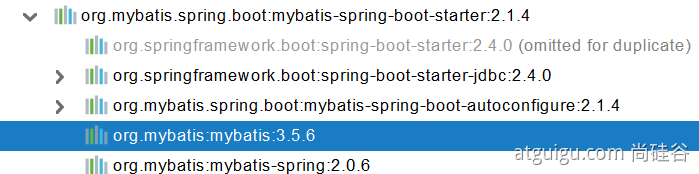
4.1 配置模式
步骤:
- 导入 mybatis 官方 starter
- 编写 mapper 接口。标准@Mapper 注解
- 编写 sql 映射文件并绑定 mapper 接口
- 在 application.yaml 中指定 Mapper 配置文件的位置,以及指定全局配置文件的信息 (建议配置在 mybatis.configuration)
原理:
- 全局配置文件
- SqlSessionFactory: 自动配置好了
- SqlSession:自动配置了 SqlSessionTemplate 组合了 SqlSession
- @Import(AutoConfiguredMapperScannerRegistrar.class);
- Mapper: 只要我们写的操作 MyBatis 的接口标准了 @Mapper 就会被自动扫描进来
@EnableConfigurationProperties(MybatisProperties.class) : MyBatis 配置项绑定类。
@AutoConfigureAfter({ DataSourceAutoConfiguration.class, MybatisLanguageDriverAutoConfiguration.class })
public class MybatisAutoConfiguration{}

@ConfigurationProperties(prefix = "mybatis")
public class MybatisProperties
可以修改配置文件中 mybatis 开始的所有
# 配置 mybatis 规则
mybatis:
  config-location: classpath:mybatis/mybatis-config.xml  #全局配置文件位置
  mapper-locations: classpath:mybatis/mapper/*.xml  #sql映射文件位置

Mapper 接口--->绑定 Xml
<?xml version="1.0" encoding="UTF-8" ?>
<!DOCTYPE mapper
        PUBLIC "-//mybatis.org//DTD Mapper 3.0//EN"
        " http://mybatis.org/dtd/mybatis-3-mapper.dtd">
<mapper namespace="com.atguigu.admin.mapper.AccountMapper">
	<!--    public Account getAcct(Long id); -->
    <select id="getAcct" resultType="com.atguigu.admin.bean.Account">
        select * from  account_tbl where  id=#{id}
    </select>
</mapper>
配置 private Configuration configuration ; mybatis.configuration 下面的所有,就是相当于改 mybatis 全局配置文件中的值
# 配置 mybatis 规则
mybatis:
#  config-location: classpath:mybatis/mybatis-config.xml
  mapper-locations: classpath:mybatis/mapper/*.xml
  configuration:
    map-underscore-to-camel-case: true

// config-location 与 configuration 只能有一个,只能有一个全局配置
4.2 注解模式
@Mapper
public interface CityMapper {
    @Select("select * from city where id=#{id}")
    public City getById(Long id);
}
4.3 混合模式
部分使用注解形式,部分使用 mapper 形式。
@Mapper
public interface CityMapper {
    @Select("select * from city where id=#{id}")
    public City getById(Long id);
    public void insert(City city);
}
最佳实战:
- 引入 mybatis-starter
- 配置 application.yaml 中,指定 mapper-location 位置即可
- 编写 Mapper 接口并标注@Mapper 注解
- 简单方法直接注解方式
- 复杂方法编写 mapper.xml 进行绑定映射
- @MapperScan (“com.atguigu.admin.mapper”) 简化,其他的接口就可以不用标注 @Mapper 注解
4.4 MybatisAutoConfiguration
MyBatis 框架的在 Spring Boot 的自动配置类 MybatisAutoConfiguration.class

imports 文件中定义了 org.mybatis.spring.boot.autoconfigure.MybatisAutoConfiguration 自动配置类
@Configuration
@ConditionalOnClass({SqlSessionFactory.class, SqlSessionFactoryBean.class})
@ConditionalOnSingleCandidate(DataSource.class)
@EnableConfigurationProperties({MybatisProperties.class})
@AutoConfigureAfter({DataSourceAutoConfiguration.class, MybatisLanguageDriverAutoConfiguration.class})
public class MybatisAutoConfiguration implements InitializingBean {
	private static final Logger logger = LoggerFactory.getLogger(MybatisAutoConfiguration.class);
	private final MybatisProperties properties;
	.....
}
关注:
MybatisProperties.class
DataSourceAutoConfiguration.class , DataSourceProperties.class
SqlSessionFactory.class
SqlSessionTemplate.class
@Bean
@ConditionalOnMissingBean
public SqlSessionFactory sqlSessionFactory(DataSource dataSource) throws Exception {
  SqlSessionFactoryBean factory = new SqlSessionFactoryBean();
  factory.setDataSource(dataSource);
  ....
}

@Bean
@ConditionalOnMissingBean
public SqlSessionTemplate sqlSessionTemplate(SqlSessionFactory sqlSessionFactory) {
  ExecutorType executorType = this.properties.getExecutorType();
  return executorType != null ? new SqlSessionTemplate(sqlSessionFactory, executorType) : new SqlSessionTemplate(sqlSessionFactory);
}
SqlSessionTemplate 是线程安全的,MyBatis 为了与 Spring 继承。提供的由 Spring 管理的 Bean。这个 SqlSesionTemplate 实现了 SqlSession 接口,能够由 Spring 事务管理器使用。提供 Spring 的事务处理。同时管理 SqlSession 的创建,销毁。
5 整合 MyBatis-Plus 【重点】
5.1 什么是 MyBatis-Plus
MyBatis-Plus (Github)(简称 MP)是一个 MyBatis 的增强工具,在 MyBatis 的基础上只做增强不做改变,为简化开发. 提高效率而生。
建议安装 MybatisX 插件
5.2 整合 MyBatis-Plus
<dependency>
    <groupId>com.baomidou</groupId>
    <artifactId>mybatis-plus-boot-starter</artifactId>
    <version>3.4.1</version>
</dependency>
<!--引入后,无需引入mybatis和jdbc依赖-->
自动配置
- MybatisPlusAutoConfiguration 配置类,MybatisPlusProperties 配置项绑定。
- mybatis-plus:xxx 就是对 mybatis-plus 的定制。
- SqlSessionFactory 自动配置好。底层是容器中默认的数据源。
- **mapperLocations 自动配置好,有默认值,为
classpath\*:/mapper/**/\*.xml**。 - SqlSessionTemplate 自动配置好
- @Mapper 标注的接口也会被自动扫描;OR @MapperScan(“com.atguigu.admin.mapper”) 批量扫描。
优点:
-
BaseMapper 接口包含基本的 CRUD 方法,Mapper 继承 **BaseMapper **就可以拥有基础的 CRUD 能力。Ctrl+F12 查看 BaseMapper 类。
-
使用时 IDEA 会爆红,不用在意,可以在接口上加上@Repository 就不会了。
-
User 所有属性都应该在数据库中存在 OR 使用
@TableField(exist = false)标识可以不存在对应属性。public interface UserMapper extends BaseMapper<User> {} @Data @TableName("user_tbl") // 指定默认的数据库表名 public class User{ @TableField(exist = false) // 从数据库中可以不存在对应属性,否则运行后会报错 private String username; }
5.3 CRUD 功能
UserService:Service 接口-处理 User
UserServiceImpl:UserService 实现类
IService<T>:Mybatis-plus 提供的对于泛型 T 的诸多操作接口。
ServiceImpl<M extends BaseMapper<T>, T>:Mybatis-plus 提供的 IService<T> 实现类。
这里包含增删改查、分页等诸多实现方法,写完下面接口和实现类,就可以直接使用 Mybatis-plus 内置的多种方法。
public interface UserService extends IService<User> {}

@Service
public class UserServiceImpl extends ServiceImpl<UserMapper,User> implements UserService {}@Autowire
UserService userService;
List<User> list = userService.list();
@GetMapping("/user/delete/{id}")
public String deleteUser(@PathVariable("id") Long id,
@RequestParam(value = "pn",defaultValue = "1")Integer pn,
RedirectAttributes ra){
userService.removeById(id);
ra.addAttribute("pn",pn);
return "redirect:/dynamic_table";
}
@GetMapping("/dynamic_table")
public String dynamic_table(@RequestParam(value="pn",defaultValue = "1") Integer pn,Model model){
//构造分页参数
Page<User> page = new Page<>(pn, 2);
//调用 page 进行分页
Page<User> userPage = userService.page(page, null);
// userPage.getRecords()
// userPage.getCurrent()
// userPage.getPages()
model.addAttribute("users",userPage);
return "table/dynamic_table";
}https://www.bilibili.com/video/BV19K4y1L7MT?p=67&spm_id_from=pageDriver 分页数据展示
https://www.bilibili.com/video/BV19K4y1L7MT?p=68&spm_id_from=pageDriver 删除用户完成
6 数据库连接池
HikariCP 连接池
https://github.com/brettwooldridge/HikariCP/wiki
连接池配置:
https://github.com/brettwooldridge/HikariCP/wiki/About-Pool-Sizing
MySQL 连接池配置建议
https://github.com/brettwooldridge/HikariCP/wiki/MySQL-Configuration
prepStmtCacheSize
这将设置 MySQL 驱动程序将缓存每个连接的预准备语句数。默认值为保守的 25。我们建议将其设置为 250-500 之间。

prepStmtCacheSqlLimit
这是驱动程序将缓存的准备好的 SQL 语句的最大长度。MySQL 默认值为 256。根据我们的经验,特别是对于像Hibernate这样的ORM框架,这个默认值远低于生成的语句长度的阈值。我们推荐的设置为 2048。

cachePrepStmts
如果缓存实际上被禁用,则上述参数都没有任何影响,因为默认情况下是禁用的。必须将此参数设置为 。true

useServerPrepStmts:较新版本的MySQL支持服务器端准备语句,这可以提供实质性的性能提升。将此属性设置为 。true
application.yml
spring:
  datasource:
    type: com.zaxxer.hikari.HikariDataSource
    driver-class-name: com.mysql.cj.jdbc.Driver
    url: jdbc:mysql://localhost:3306/blog?serverTimezone=Asia/Shanghai
    username: root
    password: 123456
    hikari:
      auto-commit: true
      # # connections = ((cpu核心数 * 2) + 磁盘数量) 近似值。 默认10
      maximum-pool-size: 10
      #最小连接数,默认10,不建议设置。默认与maximum-pool-size一样大小。推荐使用固定大小的连接池
      minimum-idle: 10
      #获取连接时,检测语句
      connection-test-query: select 1
      ###
      # 连接超时,默认30秒。
      # 控制客户端在获取池中 Connection 的等待时间,
      # 如果没有连接可用的情况下超过该时间,则抛出 SQLException 异常,
      ###
      connection-timeout: 20000
      #其他属性
      data-source-properties:
        cachePrepStmts: true
        dataSource.cachePrepStmtst: true
        dataSource.prepStmtCacheSize: 250
        dataSource.prepStmtCacheSqlLimit: 2048
        dataSource.useServerPrepStmts: true
2.、NoSQL【重点】
redis.cn
Redis 是一个开源(BSD 许可)的,内存中的数据结构存储系统,它可以用作数据库、缓存和消息中间件。它支持多种类型的数据结构,如 字符串(strings), 散列(hashes), 列表(lists), 集合(sets), 有序集合(sorted sets) 与范围查询, bitmaps, hyperloglogs 和 地理空间(geospatial) 索引半径查询。 Redis 内置了 复制(replication),LUA 脚本(Lua scripting), LRU 驱动事件(LRU eviction),事务(transactions) 和不同级别的 磁盘持久化(persistence),并通过 Redis 哨兵(Sentinel)和自动 分区(Cluster)提供高可用性(high availability)。
1 Redis 自动配置
<dependency>
    <groupId>org.springframework.boot</groupId>
    <artifactId>spring-boot-starter-data-redis</artifactId>
</dependency>
redis 默认使用 lettuce client,更换成 redis 切换到第 3 步。
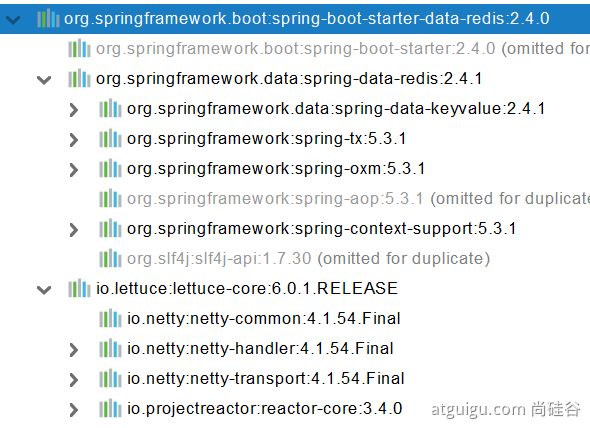
自动配置:
- RedisAutoConfiguration 自动配置类。RedisProperties 属性类 ⇒ spring.redis.xxx 是对 redis 的配置
- 连接工厂是准备好的。LettuceConnectionConfiguration、JedisConnectionConfiguration
- 自动注入了 RedisTemplate<Object, Object> : xxxTemplate;
- 自动注入了 StringRedisTemplate;k:v 都是 String
- key:value
- 底层只要我们使用 StringRedisTemplate、RedisTemplate 就可以操作 redis
2 RedisTemplate 与 Lettuce
@Test
void testRedis(){
    ValueOperations<String, String> operations = redisTemplate.opsForValue();
    operations.set("hello","world");
    String hello = operations.get("hello");
    System.out.println(hello);
}
3 切换至 jedis
<dependency>
    <groupId>org.springframework.boot</groupId>
    <artifactId>spring-boot-starter-data-redis</artifactId>
</dependency>
<!--        导入jedis-->
<dependency>
    <groupId>redis.clients</groupId>
    <artifactId>jedis</artifactId>
</dependency>spring:
redis:
host: r-bp1nc7reqesxisgxpipd.redis.rds.aliyuncs.com // 阿里 Redis 主机
port: 6379 //redis 端口
password: lfy:Lfy123456 //redis 密码
client-type: jedis //redis client 类型
jedis:
pool:
max-active: 10https://www.bilibili.com/video/BV19K4y1L7MT?p=70&spm_id_from=pageDriver Redis 中讲了 filter 和 Interceptor
使用 interceptor 来获取访问链接次数
三、声明式事务
事务分为全局事务与本地事务,本地事务是特定于资源的,例如与 JDBC 连接关联的事务。本地事务可能更容易使用,但有一个显著的缺点:它们不能跨多个事务资源工作。比如在方法中处理连接多个数据库的事务,本地事务是无效的。
Spring 解决了全局和本地事务的缺点。它允许应用程序开发人员在任何环境中使用一致的编程模型。只需编写一次代码,就可以从不同环境中的不同事务管理策略中获益。Spring 框架同时提供声明式和编程式事务管理。推荐声明式事务管理。
具体参考: Spring 事务
SpringBoot 使用 @Transactional 注解进行声明式事务方式和 Spring 进行声明式事务过程类似。
step1:对应方法上,添加 @Transactional 注解
@Transactional
@Override
public boolean postNewArticle(ArticlePO article, String content) {

  //新增文章
  articleMapper.insertArticle(article);

  if( article.getReadCount() <  1) {
    throw new RuntimeException("已读数量不能 < 1 ");
  }

 //新增文章内容
  ArticleDetailPO detail = new ArticleDetailPO();
  detail.setArticleId(article.getId());
  detail.setContent(content);
  articleMapper.insertArticleContent(detail);

  return true;
}
step2:启动类添加 @EnableTransactionManagement 注解
@MapperScan(basePackages = "com.bjpowernode.trans.repository")
@SpringBootApplicationpublic class Lession11TransApplication {

  public static void main(String[] args) {
    SpringApplication.run(Lession11TransApplication.class, args);
  }
}