Linux 集群部署(8.x 版本)
Elasticsearch 的官方地址: https://www.elastic.co/cn/
Elasticsearch 最新的版本是 8.2.3(截止 2022.06.15),我们选择略早的 8.1.0 版本下载地址: https://www.elastic.co/cn/downloads/past-releases#elasticsearch
ES 8.x 版本开始,使用 JDK 17,但自带 JDK,所以节点无需 Java 环境。
安装软件
将软件安装到 /opt/module/elasticsearch-8.1.0 中
一、解压缩文件
# 切换目录
cd software
# 解压缩
tar -zxvf elasticsearch-8.1.0-linux-x86_64.tar.gz -C /opt/module
二、配置用户、数据、证书
# 新增es用户
useradd es
# 为 es 用户设置密码
passwd es
# 创建数据文件目录
mkdir /opt/module/elasticsearch-8.1.0/data
# 创建证书目录
mkdir /opt/module/elasticsearch-8.1.0/config/certs
#切换目录
cd /opt/module/elasticsearch-8.1.0
# 修改文件拥有者
chown -R es:es /opt/module/elasticsearch-8.1.0
三、在第一台服务器节点 es-node-1 设置集群多节点通信密钥
# 切换用户
su es
# 签发 ca 证书,过程中需按两次回车键
bin/elasticsearch-certutil ca
# 用 ca 证书签发节点证书,过程中需按三次回车键
bin/elasticsearch-certutil cert --ca elastic-stack-ca.p12
# 将生成的证书文件移动到 config/certs 目录中
mv elastic-stack-ca.p12 elastic-certificates.p12 config/certs
四、在第一台服务器节点 es-node-1 设置集群多节点 HTTP 证书
# 签发 Https 证书
bin/elasticsearch-certutil http
# 以下是每次要求输入时,需要输入的内容
# Generate a CSR? n
# Use an existing CA? y
# CA Path:certs/elastic-stack-ca.p12
# Password:无需输入
# certicicate valid: 20y
# generate a certificate per node? n
# Enter all the hostnames that you need, one per line. 略
# Enter IP address. 略
# Do you wish to change any of there options? n
# 不给证书加密,两次 Enter
# 解压文件
unzip elasticsearch-ssl-http.zip
# 移动文件
mv elasticsearch/http.p12 kibana/elasticsearch-ca.pem config/certs五、修改主配置文件: config/elasticsearch.yml
# 设置 ES 集群名称
cluster.name: es-cluster
# 设置集群中当前节点名称
node.name: es-node-1
# 设置数据,日志文件路径
path.data: /opt/module/elasticsearch-8.1.0/data path.logs: /opt/module/elasticsearch-8.1.0/log # 设置网络访问节点
network.host: linux1
# 设置网络访问端口
http.port: 9200
# 初始节点
discovery.seed_hosts: ["linux1"]
# 安全认证
xpack.security.enabled: true
xpack.security.enrollment.enabled: true
xpack.security.http.ssl:
  enabled: true
  keystore.path: /opt/module/elasticsearch-8.1.0/config/certs/http.p12
  truststore.path: /opt/module/elasticsearch-8.1.0/config/certs/http.p12
xpack.security.transport.ssl:
  enabled: true
  verification_mode: certificate
  keystore.path:
/opt/module/elasticsearch-8.1.0/config/certs/elastic-certificates.p12
  truststore.path:
/opt/module/elasticsearch-8.1.0/config/certs/elastic-certificates.p12 # 此处需注意,es-node-1 为上面配置的节点名称
cluster.initial_master_nodes: ["es-node-1"]
http.host: [_local_, _site_]
ingest.geoip.downloader.enabled: false
xpack.security.http.ssl.client_authentication: none
六、启动 ES 软件
bin/elasticsearch第一次成功启动后,会显示密码,请记住,访问时需要。只有第一次才有哟!
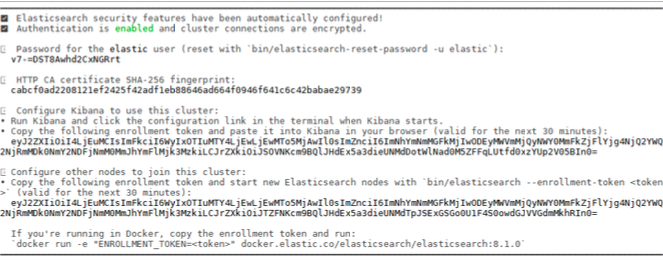
注意:9300 端口为 Elasticsearch 集群间组件的通信端口,9200 端口为浏览器访问的 http 协议 RESTful 端口。
七、访问服务器节点 https://虚拟机地址:9200
因为配置了安全协议,所以使用 https 协议进行访问,但由于证书是自己生成的,并不 可靠,所以会有安全提示
八、修改集群中其他节点的配置文件:config/elasticsearch.yml
linux2: 证书直接拷贝,其他步骤完全相同,配置文件中修改如下内容即可
# 设置节点名称
node.name: es-node-2
# 设置网络访问主机
network.host: linux2
linux3: 证书直接拷贝,其他步骤完全相同,配置文件中修改如下内容即可
# 设置节点名称
node.name: es-node-3
# 设置网络访问主机
network.host: linux3
九、依次启动集群的三台服务器节点, 不要忘记切换用户后再启动
# 三个服务器节点均执行
bin/elasticsearch -d
补充说明与问题解决
-
如果系统配置 ES_JAVA_HOME 环境变量,那么会采用系统配置的 JDK。如果没有配置该环境变量,ES 会使用自带捆绑的 JDK。虽然自带的 JDK 是 ES 软件推荐的 Java 版本,但一般建议使用系统配置的 JDK。
-
第一次启动时,因为开启了密码验证模式,在启动窗口中会显示输入账号和密码。如果没有注意到或没有找到账号密码,可以设置免密登录:
# Enable security features
xpack.security.enabled: false- 双击启动窗口闪退,通过路径访问追踪错误,如果是“空间不足”,请修改
config/jvm.options配置文件
# 设置 JVM 初始内存为 1G。此值可以设置与-Xmx 相同,以避免每次垃圾回收完成后 JVM 重新分配 内存
# Xms represents the initial size of total heap space
# 设置 JVM 最大可用内存为 1G
# Xmx represents the maximum size of total heap space
-Xms4g
-Xmx4g- 启动后,如果密码忘记了,怎么办?可以采用指令重置密码。如果只启动单一节点,此操作可能会失败,至少启动 2 个节点,测试成功。
bin/elasticsearch-reset-password -u elasticKibana 安装与使用(8.x 版本)
Elasticsearch 下载的版本是 8.1.0,这里我们选择同样的 8.1.0 版本
下载地址: https://www.elastic.co/cn/downloads/past-releases#kibana
安装软件
一、下载与解压文件
# 软件安装到 /opt/module/kibana-8.1.0
# 切换目录
cd software
# 解压缩
tar -zxvf kibana-8.1.0-linux-x86_64.tar.gz -C /opt/module
二、生成证书文件
# 在 ES 服务器中生成证书,输入回车即可
cd /opt/module/elasticsearch-8.1.0 bin/elasticsearch-certutil csr -name kibana -dns linux1
# 解压文件
unzip csr-bundle.zip
# 将解压后的文件移动到 kibana 的 config 目录中
mv kibana.csr kibana.key /opt/module/kibana-8.1.0/config/
# 生成 crt 文件
openssl x509 -req -in kibana.csr -signkey kibana.key -out kibana.crt
三、修改配置文件:kibana.yml
# 服务端口
server.port: 5601
# 服务主机名
server.host: "linux1"
# 国际化 - 中文
i18n.locale: "zh-CN"
# ES 服务主机地址
elasticsearch.hosts: ["https://linux1:9200"]
# 访问 ES 服务的账号密码
elasticsearch.username: "kibana"
elasticsearch.password: "fnqIYLQGv81iyW5nWeZ-"

elasticsearch.ssl.verificationMode: none

elasticsearch.ssl.certificateAuthorities:
[ "/opt/module/elasticsearch-8.1.0/config/certs/elasticsearch-ca.pem" ]

server.ssl.enabled: true
server.ssl.certificate: /opt/module/kibana-8.1.0/config/kibana.crt
server.ssl.key: /opt/module/kibana-8.1.0/config/kibana.key
四、修改软件目录拥有者
# 切换目录
chown -R es:es /opt/module/kibana-8.1.0/
五、切换用户,启动软件
# 切换用户
su es
# 启动软件
bin/kibana
# 也可以后台启动
nohup /opt/module/kibana-8.1.0/bin/kibana >kibana.log 2>&1 &
打开软件
打开浏览器,输入访问地址:https://linux1:5601
Linux 单节点部署
软件安装
一、下载软件
二、解压软件
# 解压缩
tar -zxvf elasticsearch-7.8.0-linux-x86_64.tar.gz -C /opt/module
# 改名
mv elasticsearch-7.8.0 es
三、创建用户
因为安全问题, Elasticsearch 不允许 root 用户直接运行,所以要创建新用户,在 root 用户中创建新用户。
useradd es #新增 es 用户
passwd es #为 es 用户设置密码
userdel -r es #如果错了,可以删除再加
chown -R es:es /opt/module/es #文件夹所有者
四、修改配置文件
修改/opt/module/es/config/elasticsearch.yml 文件。
# 加入如下配置
cluster.name: elasticsearch
node.name: node-1
network.host: 0.0.0.0
http.port: 9200
cluster.initial_master_nodes: ["node-1"]
修改/etc/security/limits.conf
# 在文件末尾中增加下面内容
# 每个进程可以打开的文件数的限制
es soft nofile 65536
es hard nofile 65536
修改/etc/security/limits.d/20-nproc.conf
# 在文件末尾中增加下面内容
# 每个进程可以打开的文件数的限制
es soft nofile 65536
es hard nofile 65536
# 操作系统级别对每个用户创建的进程数的限制
* hard nproc 4096
# 注: * 带表 Linux 所有用户名称
修改/etc/sysctl.conf
# 在文件中增加下面内容
# 一个进程可以拥有的 VMA(虚拟内存区域)的数量,默认值为 65536
vm.max_map_count=655360
重新加载
sysctl -p启动软件
使用 ES 用户启动
cd /opt/module/es/
#启动
bin/elasticsearch
#后台启动
bin/elasticsearch -d
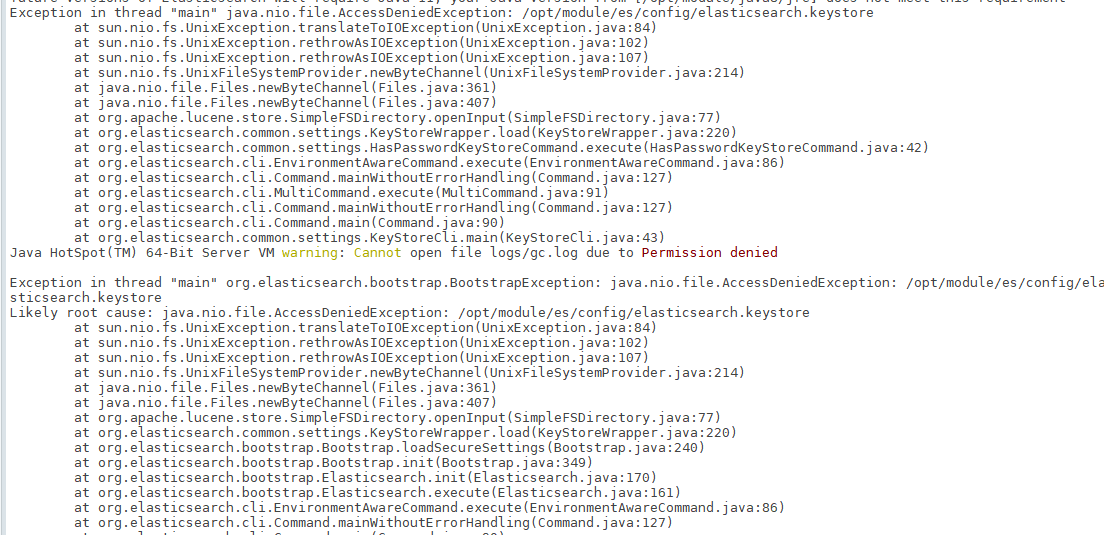
启动时,会动态生成文件,如果文件所属用户不匹配,会发生错误,需要重新进行修改用户和用户组
关闭防火墙
#暂时关闭防火墙
systemctl stop firewalld
#永久关闭防火墙
systemctl enable firewalld.service #打开防火墙永久性生效,重启后不会复原
systemctl disable firewalld.service #关闭防火墙,永久性生效,重启后不会复原
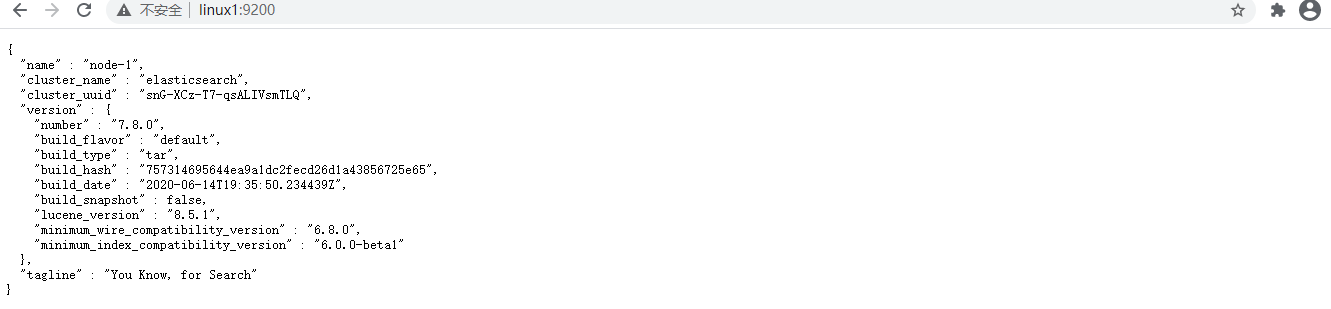
测试软件
浏览器中输入地址: http://linux1:9200/
Linux 集群部署
软件安装
一、下载软件
二、解压软件
# 解压缩
tar -zxvf elasticsearch-7.8.0-linux-x86_64.tar.gz -C /opt/module
# 改名
mv elasticsearch-7.8.0 es-cluster
将软件分发到其他节点: linux2, linux3
三、创建用户
因为安全问题, Elasticsearch 不允许 root 用户直接运行,所以要创建新用户,在 root 用户中创建新用户。
useradd es #新增 es 用户
passwd es #为 es 用户设置密码
userdel -r es #如果错了,可以删除再加
chown -R es:es /opt/module/es #文件夹所有者
四、修改配置文件
修改/opt/module/es/config/elasticsearch.yml 文件,分发文件。
# 加入如下配置
#集群名称
cluster.name: cluster-es
#节点名称, 每个节点的名称不能重复
node.name: node-1
#ip 地址, 每个节点的地址不能重复
network.host: linux1
#是不是有资格主节点
node.master: true
node.data: true
http.port: 9200
# head 插件需要这打开这两个配置
http.cors.allow-origin: "*"
http.cors.enabled: true
http.max_content_length: 200mb
#es7.x 之后新增的配置,初始化一个新的集群时需要此配置来选举 master
cluster.initial_master_nodes: ["node-1"]
#es7.x 之后新增的配置,节点发现
discovery.seed_hosts: ["linux1:9300", "linux2:9300", "linux3:9300"]
gateway.recover_after_nodes: 2
network.tcp.keep_alive: true
network.tcp.no_delay: true
transport.tcp.compress: true
#集群内同时启动的数据任务个数,默认是 2 个
cluster.routing.allocation.cluster_concurrent_rebalance: 16
#添加或删除节点及负载均衡时并发恢复的线程个数,默认 4 个
cluster.routing.allocation.node_concurrent_recoveries: 16
#初始化数据恢复时,并发恢复线程的个数,默认 4 个
cluster.routing.allocation.node_initial_primaries_recoveries: 16
修改/etc/security/limits.conf ,分发文件
# 在文件末尾中增加下面内容
es soft nofile 65536
es hard nofile 65536
修改/etc/security/limits.d/20-nproc.conf,分发文件
# 在文件末尾中增加下面内容
es soft nofile 65536
es hard nofile 65536
\* hard nproc 4096
\# 注: * 带表 Linux 所有用户名称
修改/etc/sysctl.conf
# 在文件中增加下面内容
vm.max_map_count=655360
重新加载
sysctl -p启动软件
分别在不同节点上启动 ES 软件
cd /opt/module/es-cluster
#启动
bin/elasticsearch
#后台启动
bin/elasticsearch -d
测试集群

Windows 集群部署
部署集群
一、创建 elasticsearch-cluster 文件夹
创建 elasticsearch-7.8.0-cluster 文件夹,在内部复制三个 elasticsearch 服务。
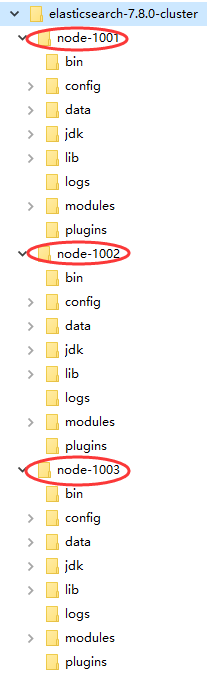
二、修改集群文件目录中每个节点的 config/elasticsearch.yml 配置文件
node-1001 节点
#节点 1 的配置信息:
#集群名称,节点之间要保持一致
cluster.name: my-elasticsearch
#节点名称,集群内要唯一
node.name: node-1001
node.master: true
node.data: true
#ip 地址
network.host: localhost
#http 端口
http.port: 1001
#tcp 监听端口
transport.tcp.port: 9301
#discovery.seed_hosts: ["localhost:9301", "localhost:9302","localhost:9303"]
#discovery.zen.fd.ping_timeout: 1m
#discovery.zen.fd.ping_retries: 5
#集群内的可以被选为主节点的节点列表
#cluster.initial_master_nodes: ["node-1", "node-2","node-3"]
#跨域配置
#action.destructive_requires_name: true
http.cors.enabled: true
http.cors.allow-origin: "*"
node-1002 节点
#节点 2 的配置信息:
#集群名称,节点之间要保持一致
cluster.name: my-elasticsearch
#节点名称,集群内要唯一
node.name: node-1002
node.master: true
node.data: true
#ip 地址
network.host: localhost
#http 端口
http.port: 1002
#tcp 监听端口
transport.tcp.port: 9302
discovery.seed_hosts: ["localhost:9301"]
discovery.zen.fd.ping_timeout: 1m
discovery.zen.fd.ping_retries: 5
#集群内的可以被选为主节点的节点列表
#cluster.initial_master_nodes: ["node-1", "node-2","node-3"]
#跨域配置
#action.destructive_requires_name: true
http.cors.enabled: true
http.cors.allow-origin: "*"
node-1003 节点
#节点 3 的配置信息:
#集群名称,节点之间要保持一致
cluster.name: my-elasticsearch
#节点名称,集群内要唯一
node.name: node-1003
node.master: true
node.data: true
#ip 地址
network.host: localhost
#http 端口
http.port: 1003
#tcp 监听端口
transport.tcp.port: 9303
#候选主节点的地址,在开启服务后可以被选为主节点
discovery.seed_hosts: ["localhost:9301", "localhost:9302"]
discovery.zen.fd.ping_timeout: 1m
discovery.zen.fd.ping_retries: 5
#集群内的可以被选为主节点的节点列表
#cluster.initial_master_nodes: ["node-1", "node-2","node-3"]
#跨域配置
#action.destructive_requires_name: true
http.cors.enabled: true
http.cors.allow-origin: "*"
三、如果有必要,删除每个节点中的 data 目录中所有内容。
启动集群
分别依次双击执行节点的 bin/elasticsearch.bat, 启动节点服务器(可以编写一个脚本启动),启动后,会自动加入指定名称的集群。
测试集群
一、用 Postman,查看集群状态
GET http://127.0.0.1:1001/_cluster/healthGET http://127.0.0.1:1002/_cluster/healthGET http://127.0.0.1:1003/_cluster/health
返回结果皆为如下:
{
  "cluster_name": "my-application",
  "status": "green",
  "timed_out": false,
  "number_of_nodes": 3,
  "number_of_data_nodes": 3,
  "active_primary_shards": 0,
  "active_shards": 0,
  "relocating_shards": 0,
  "initializing_shards": 0,
  "unassigned_shards": 0,
  "delayed_unassigned_shards": 0,
  "number_of_pending_tasks": 0,
  "number_of_in_flight_fetch": 0,
  "task_max_waiting_in_queue_millis": 0,
  "active_shards_percent_as_number": 100.0
}
status 字段指示着当前集群在总体上是否工作正常。它的三种颜色含义如下:
- green:所有的主分片和副本分片都正常运行。
- yellow:所有的主分片都正常运行,但不是所有的副本分片都正常运行。
- red:有主分片没能正常运行。
二、用 Postman,在一节点增加索引,另一节点获取索引
向集群中的 node-1001 节点增加索引:
#PUT http://127.0.0.1:1001/user返回结果:
{
  "acknowledged": true,
  "shards_acknowledged": true,
  "index": "user"
}
向集群中的 node-1003 节点获取索引:
#GET http://127.0.0.1:1003/user返回结果:
{
  "user": {
    "aliases": {},
    "mappings": {},
    "settings": {
      "index": {
        "creation_date": "1617993035885",
        "number_of_shards": "1",
        "number_of_replicas": "1",
        "uuid": "XJKERwQlSJ6aUxZEN2EV0w",
        "version": {
          "created": "7080099"
        },
        "provided_name": "user"
      }
    }
  }
}
如果在 1003 创建索引,同样在 1001 也能获取索引信息,这就是集群能力。
Kibana 安装与使用
Kibana 是一个免费且开放的用户界面,能够让你对 Elasticsearch 数据进行可视化,并让你在 Elastic Stack 中进行导航。你可以进行各种操作,从跟踪查询负载,到理解请求如何流经你的整个应用,都能轻松完成。
下载地址: https://artifacts.elastic.co/downloads/kibana/kibana-7.8.0-windows-x86_64.zip
-
解压缩下载的 zip 文件
-
修改 config/kibana.yml 文件
# 默认端口
server.port: 5601
# ES服务器的地址
elasticsearch.hosts: ["http://localhost:9200"] # 索引名
kibana.index: ".kibana"
# 支持中文
i18n.locale: "zh-CN"-
Windows 环境下执行 bin/kibana.bat
-
通过浏览器访问 : http://localhost:5601