Git 远程仓库(Github)
Git 并不像 SVN 那样有个中心服务器。
目前我们使用到的 Git 命令都是在本地执行,如果你想通过 Git 分享你的代码或者与其他开发人员合作。 你就需要将数据放到一台其他开发人员能够连接的服务器上。
本例使用了 Github 作为远程仓库,你可以先阅读我们的 Github 简明教程。
1 添加远程库
要添加一个新的远程仓库,可以指定一个简单的名字,以便将来引用,命令格式如下:
git remote add [shortname] [url]
由于你的本地 Git 仓库和 GitHub 仓库之间的传输是通过SSH加密的,所以我们需要配置验证信息。
1.1 - 本地生成 SSH Key:
$ ssh-keygen -t rsa -C "youremail@example.com"
后面的 your_email@youremail.com 改为你在 Github 上注册的邮箱,之后会要求确认路径和输入密码,我们这使用默认的一路回车就行。
$ ssh-keygen -t rsa -C "429240967@qq.com"
Generating public/private rsa key pair.
Enter file in which to save the key (/Users/tianqixin/.ssh/id_rsa):
Enter passphrase (empty for no passphrase):    # 直接回车
Enter same passphrase again:                   # 直接回车
Your identification has been saved in /Users/tianqixin/.ssh/id_rsa.
Your public key has been saved in /Users/tianqixin/.ssh/id_rsa.pub.
The key fingerprint is:
SHA256:MDKVidPTDXIQoJwoqUmI4LBAsg5XByBlrOEzkxrwARI 429240967@qq.com
The key's randomart image is:
+---[RSA 3072]----+
|E*+.+=**oo       |
|%Oo+oo=o. .      |
|%**.o.o.         |
|OO.  o o         |
|+o+     S        |
|.                |
|                 |
|                 |
|                 |
+----[SHA256]-----+
成功的话会在 ~/ 下生成 .ssh 文件夹,进去,打开 id_rsa.pub,复制里面的 key。
1.2 - github 输入SSH Key
Account ⇒ Settings ⇒ SSH and GPG Keys
Title 填写 SSH Key 的备注,Key 填写 id_rsa.pub 中的字符串。
1.3 - 进行验证并绑定
$ ssh -T git@github.com
The authenticity of host 'github.com (52.74.223.119)' can't be established.
RSA key fingerprint is SHA256:nThbg6kXUpJWGl7E1IGOCspRomTxdCARLviKw6E5SY8.
Are you sure you want to continue connecting (yes/no/[fingerprint])? yes                   # 输入 yes
Warning: Permanently added 'github.com,52.74.223.119' (RSA) to the list of known hosts.
Hi tianqixin! You've successfully authenticated, but GitHub does not provide shell access. # 成功信息
1.4 - 添加远程仓库连接
$ git remote add origin git@github.com:tianqixin/runoob-git-test.git
2 其他操作
2.1 - 查看当前的远程库
$ git remote
origin

$ git remote -v
origin    git@github.com:tianqixin/runoob-git-test.git (fetch) origin    git@github.com:tianqixin/runoob-git-test.git (push)
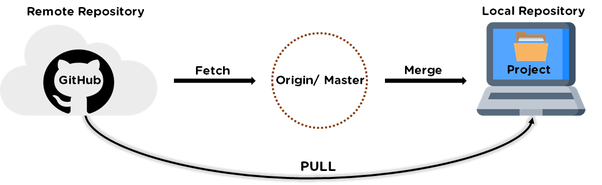
2.2 - 提取远程仓库
从远程仓库下载新分支与数据:
git fetch [alias]
从远端仓库提取数据并尝试合并到当前分支:
git merge [alias]/[branch]
2.3 - 推送到远程仓库
推送你的新分支与数据到某个远端仓库命令:
git push [alias] [branch]
以上命令将你的 [branch] 分支推送成为 [alias] 远程仓库上的 [branch] 分支,实例如下。
2.4 - 删除远程仓库
删除远程仓库你可以使用命令:
git remote rm [别名]
$ git remote -v
origin    git@github.com:tianqixin/runoob-git-test.git (fetch)
origin    git@github.com:tianqixin/runoob-git-test.git (push)

# 添加仓库 origin2
$ git remote add origin2 git@github.com:tianqixin/runoob-git-test.git

$ git remote -v
origin    git@github.com:tianqixin/runoob-git-test.git (fetch)
origin    git@github.com:tianqixin/runoob-git-test.git (push)
origin2    git@github.com:tianqixin/runoob-git-test.git (fetch)
origin2    git@github.com:tianqixin/runoob-git-test.git (push)

# 删除仓库 origin2
$ git remote rm origin2
$ git remote -v
origin    git@github.com:tianqixin/runoob-git-test.git (fetch)
origin    git@github.com:tianqixin/runoob-git-test.git (push)