1 处理 JSON 相关的注解
@ResponseBody:将 Controller 中方法的返回值转为 JSON 对象响应给客户端,可以作用在方法上或者方法的返回值上。@RequestBody:将 Http 请求中 JSON 对象的数据转为对应的 Java 对象,用在方法的形参上。@RestController:它是@Controller+@ResponseBody的组合,作用在类上,表示将该类的 Bean 由 IOC 容器管理,并且该类中的所有方法均以 JSON 格式返回。
准备工作:
由于 SpringMVC 处理 JSON 数据跟 Jackson 有关,所以需要导入 Jackson 的依赖,以免发生异常:
<dependency>
    <groupId>com.fasterxml.jackson.core</groupId>
    <artifactId>jackson-databind</artifactId>
    <version>2.12.2</version>
</dependency>
<dependency>
	<groupId>com.fasterxml.jackson.core</groupId>
	<artifactId>jackson-core</artifactId>
	<version>2.12.2</version>
</dependency>
Jackson 根据它的默认方式序列化和反序列化 Java 对象,我们可以灵活的使用 Jackson 的注解。Jackson 中常用的注解及用法如下。
| 注解 | 用法 |
|---|---|
@JsonProperty | 用于属性,把属性的名称序列化时转换为另外一个名称。示例:@JsonProperty (“birth_ Date”) |
@JsonFormat | 用于属性或者方法,把日期格式转指定的格式。示例:@JsonFormat (pattern = “yyyy-MM-dd HH:mm:ss: SSS”, timezone = “GMT+8”) |
@JsonIgnore | 用于属性或者方法上,用来完全忽略被标注的字段和方法对应的属性,即便这个还有其它注解 |
@JsonIgnoreProperties | 和@JsonIgnore 的作用相同,不同之处是 @JsonIgnoreProperties 是作用在类上的,示例:@JsonIngoreProperties (value={“userName”,“userPwd”}) |
@JsonPropertyOrder | 用于类,指定属性在序列化时 JSON 中的顺序,示例:@JsonPropertyOrder ({ “userBirth”, “userName” }) |
@JsonInclude | 属性值为 null 的不参与序列化。例子:@JsonInclude (JsonInclude. Include. NON_NULL) |
创建一个实体类用于测试数据:
public class User {
    private Integer id;
    private String userName;
    private String userPwd;
    // Jackson中的日期格式化
    @JsonFormat(pattern = "yyyy-MM-dd")
    private Date userBirth;
    // setter getter 无参 全参构造器 toString方法省略
}
2 使用@ResponseBody 返回 JSON 数据
当我们使用了@ResponseBody 注解来修饰方法或者类,则方法的返回值就不要再设置为页面的跳转了,而是要写成需要返回的数据,SpringMVC 会自动将其转为 JSON 格式的对象返回给客户端。后台 Controller 代码:
@Controller
public class AjaxController {

    @RequestMapping("/findAll")
    @ResponseBody
    public List<User> findAll(){
        List<User> list = new ArrayList<>();
        list.add(new User(1,"张三","123456",new Date()));
        list.add(new User(2,"李四","abcd1236",new Date()));
        list.add(new User(3,"王五","a4f5ffe",new Date()));
        return list;
    }
}
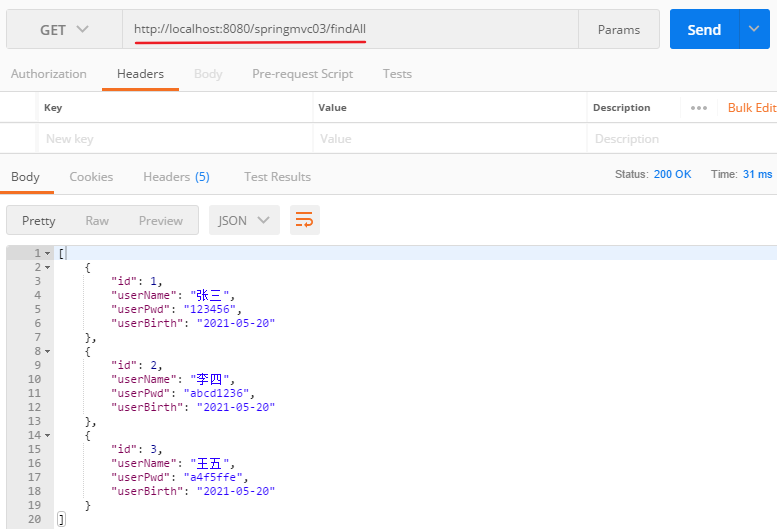
PostMan 测试的结果如下:
3 使用@RequestBody 接收前台 JSON 数据
由于 Jackson 的存在,前台的字段会自动与实体中的字段进行匹配。后台 Controller 代码如下:
@Controller
public class AjaxController {

    @RequestMapping("/addUser")
    @ResponseBody
    public User addUser(@RequestBody User user){
        System.out.println(user.toString());
        return user;
    }
}
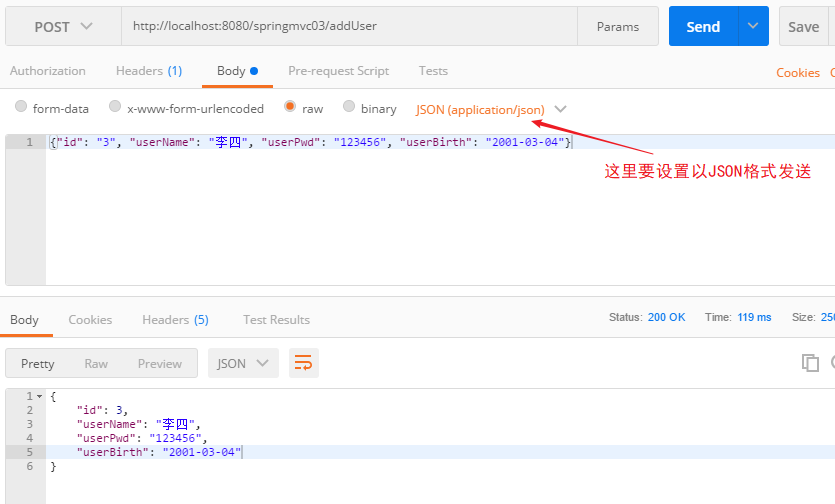
PostMan 测试的结果如下所示:
前面都是使用 PostMan 进行的测试。下面是前台页面通过 Ajax 发送请求的案例,参数为 JSON 对象,前台页面如下所示:
<%@ page contentType="text/html;charset=UTF-8" language="java" %>
<html>
  <head>
    <title>ajax发送json</title>
    <script src="https://libs.baidu.com/jquery/2.1.4/jquery.min.js"></script>
    <script type="text/javascript">
      $(function () {
        // 定义JSON字符串
        let user_jsonStr = {
          id: "3",
          userName: "李四",
          userPwd: "123456",
          userBirth: new Date(),
        };
        // 转为JSON对象
        let jsonObj = JSON.stringify(user_jsonStr);

        $("#btn").click(function () {
          $.ajax({
            url: "${pageContext.request.contextPath}/addUser",
            type: "post", // 请求的方式
            data: jsonObj, // 发送的数据,上面已经定义
            dataType: "json", // 响应回来的数据格式
            contentType: "application/json;charset=UTF-8", // 表示发送给服务器的数据类型,这里设置为json格式
            success: function (resp) {
              console.log(resp);
            },
          });
        });
      });
    </script>
  </head>
  <body>
    <button id="btn">发送JSON数据</button>
  </body>
</html>
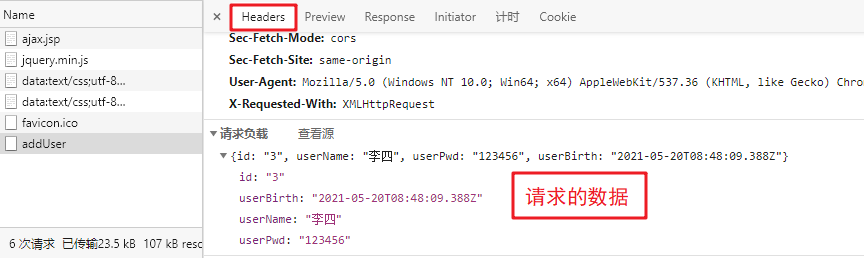
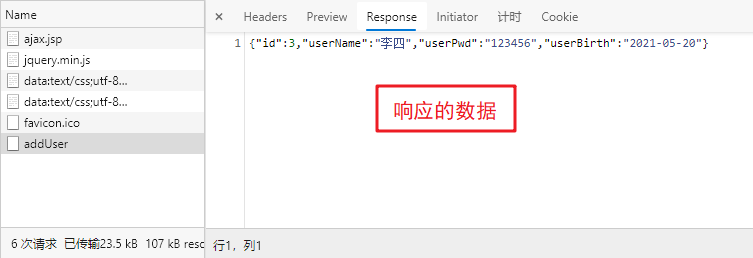
测试的结果为:
关于@RequestBody 的详细使用可以参考:https://blog.csdn.net/justry_deng/article/details/80972817/